> ## Documentation Index
> Fetch the complete documentation index at: https://help.tivero.app/llms.txt
> Use this file to discover all available pages before exploring further.
# Teams and supervisors
> Create teams, name managers and decide who approves team members' requests.
A team groups people in the calendar, reports and approvals. A supervisor is the person someone reports to — by default, the supervisor approves that person's requests.
**Who:** Administrators and the Owner create and edit teams. HR assigns people to teams and supervisors.
## Create a team
In the **Organization** menu, click **Teams**, then **Add team**.
Enter the **Name**, choose a **Color** (used in the calendar) and the **Team manager**.
Under **Who approves this team's requests**, pick one of the options (described below).
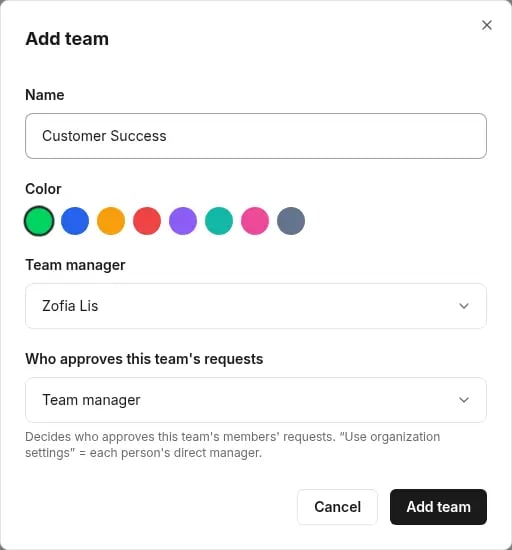 Click **Add team**.
## Who approves the team's requests
| Option | Who approves |
| ----------------------------- | ----------------------------------------------------------------------------------------------------------------- |
| **Use organization settings** | Each person's direct manager, according to the [organization's approval settings](/en/time-off/approval-process). |
| **Team manager** | This team's manager. |
| **A specific person** | A person you choose. |
| **Members' direct managers** | Each team member's supervisor. |
You can set a separate approval setup for an individual person on their page. See [How approval works](/en/time-off/approval-process).
## Assign a person to a team and supervisor
Go to **People** and open the person for editing.
Set the **Team** and **Supervisor** fields, then save.
The supervisor defines the reporting line. The access role (for example Manager) defines permissions in Tivero.
## Team page
Click a team to see its members, who is **Out today** and **Upcoming absences**. **View in calendar** opens the team calendar.
## Related articles
* [Add and invite people](/en/people/add-and-invite-people)
* [How approval works](/en/time-off/approval-process)
* [Manager guide](/en/roles/manager-guide)
Click **Add team**.
## Who approves the team's requests
| Option | Who approves |
| ----------------------------- | ----------------------------------------------------------------------------------------------------------------- |
| **Use organization settings** | Each person's direct manager, according to the [organization's approval settings](/en/time-off/approval-process). |
| **Team manager** | This team's manager. |
| **A specific person** | A person you choose. |
| **Members' direct managers** | Each team member's supervisor. |
You can set a separate approval setup for an individual person on their page. See [How approval works](/en/time-off/approval-process).
## Assign a person to a team and supervisor
Go to **People** and open the person for editing.
Set the **Team** and **Supervisor** fields, then save.
The supervisor defines the reporting line. The access role (for example Manager) defines permissions in Tivero.
## Team page
Click a team to see its members, who is **Out today** and **Upcoming absences**. **View in calendar** opens the team calendar.
## Related articles
* [Add and invite people](/en/people/add-and-invite-people)
* [How approval works](/en/time-off/approval-process)
* [Manager guide](/en/roles/manager-guide)