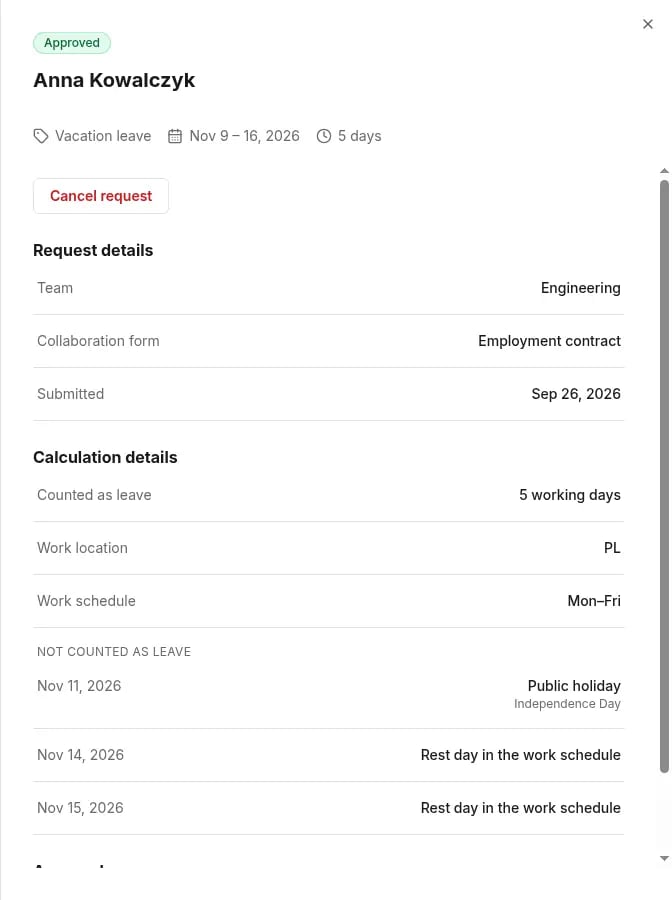
An absence request is counted in working days, not calendar days. Tivero works out a person’s working days from several settings your organization configures.
What makes up a person’s working-day calendar
Tivero counts requests only from a holiday calendar your organization has confirmed. If the calendar for a work location and year isn’t confirmed, requests for that period are blocked with “The holiday calendar needs to be set up by an administrator.”. This is a deliberate safeguard: Tivero doesn’t guess which days are off for you.
Who decides the holidays
Tivero suggests holidays from its calendar provider as a reference calendar. Your organization decides which days are off: it reviews the suggestion, corrects it and confirms it. Only the confirmed calendar is used to count requests.
Tivero doesn’t guarantee that the suggestion is legally correct in every country. In some countries, whether a holiday is a day off depends on contracts or collective agreements. Check each date before you confirm.
Check how a specific request was calculated
Open the request. The Calculation details section shows how many days count, the work location, the schedule, and every day that doesn’t count, with the reason. Approvers see the same information under the How was … calculated? link.
Possible reasons:
Changing settings
Changes to the schedule, work location or calendar apply from a chosen date. They don’t recalculate requests that were already submitted.
Related articles